
Published today, 2/28/26 4:40 pm
- 11 views • 11 today
- 6
- 3

30
Need help to share your Sims 4 content to the Sandbox Galaxy?
Here's a short guide to get you started!
Making a download: Sims 4 Tray Importer
The Sims 4 Tray Importer by deevo is just the thing you need. Careful! The download page comes with a lot of ads and fake download buttons.
Look for the orange Download this file button
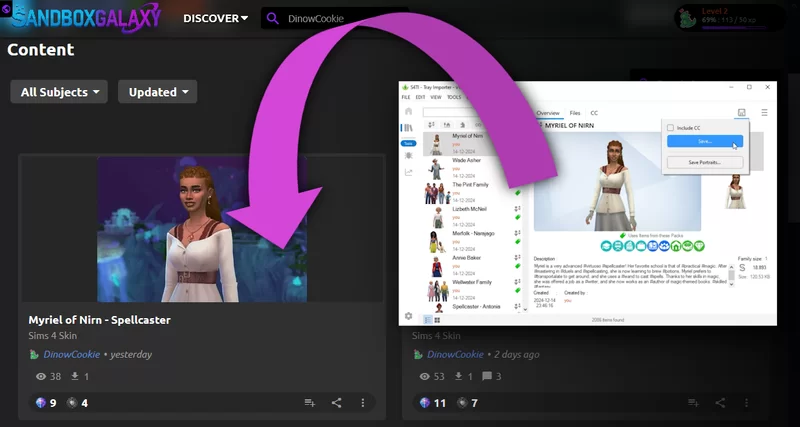
The program allows you to find and save your households, lots and rooms from your Sims 4 tray folder.
It will list them as saved in your game. Using the 💾-icon, you can Save... the item as a .zip. This is the file to share on SBG!
Users can install the item by placing the content from your .zip into Documents/Electronic Arts/The Sims 4/Tray.

Save portraits...
Tray Importer also allows you to save the portraits of your Sims content as images with a transparent background!
Useful for featuring on your submission page.
Screenshots
In The Sims 4 you can easily take a screenshot using the "C"-key. In live-mode, build-mode or in Create-a-Sim!
If you press Tab in live-mode or build-mode, you will enter free camera mode. You can then position the camera and take screenshots from better angles than you would in regular view. Movement Controls in free camera mode are:
Green screen CAS background
The Green Screen CAS Background mod by Katverse replaces the backdrop in Create-a-Sim with a bright green. This allows you to take screenshots in Create-a-Sim from which you to easily remove the background in your favorite image editor. Careful! This download page also comes with a lot of ads and fake download buttons.
You install the mod by saving it in Documents/Electronic Arts/The Sims 4/Mods. I would recommend only installing it when taking screenshots for editing, and uninstalling it when you're playing. It's way too flashy for playing dress-up.

Gallery
Of course you can refer to the in-game Gallery as well.
Let viewers know your EA ID, item title or used hashtags to help them search for your item through the game.
Questions? More tips?
Share them in a comment!
Good luck sharing your Sims 4 content.
Here's a short guide to get you started!
Making a download: Sims 4 Tray Importer
The Sims 4 Tray Importer by deevo is just the thing you need. Careful! The download page comes with a lot of ads and fake download buttons.
Look for the orange Download this file button
The program allows you to find and save your households, lots and rooms from your Sims 4 tray folder.
It will list them as saved in your game. Using the 💾-icon, you can Save... the item as a .zip. This is the file to share on SBG!
Users can install the item by placing the content from your .zip into Documents/Electronic Arts/The Sims 4/Tray.
Save portraits...
Tray Importer also allows you to save the portraits of your Sims content as images with a transparent background!
Useful for featuring on your submission page.
Screenshots
In The Sims 4 you can easily take a screenshot using the "C"-key. In live-mode, build-mode or in Create-a-Sim!
If you press Tab in live-mode or build-mode, you will enter free camera mode. You can then position the camera and take screenshots from better angles than you would in regular view. Movement Controls in free camera mode are:
- WASD: Moves the camera forward, backward, left, and right.
- Shift + WASD: Moves the camera faster.
- Q / E: Lowers or raises the camera height.
- Mouse: Rotates the camera angle.
- Mouse wheel: Zooms in or out.
Green screen CAS background
The Green Screen CAS Background mod by Katverse replaces the backdrop in Create-a-Sim with a bright green. This allows you to take screenshots in Create-a-Sim from which you to easily remove the background in your favorite image editor. Careful! This download page also comes with a lot of ads and fake download buttons.
You install the mod by saving it in Documents/Electronic Arts/The Sims 4/Mods. I would recommend only installing it when taking screenshots for editing, and uninstalling it when you're playing. It's way too flashy for playing dress-up.
Gallery
Of course you can refer to the in-game Gallery as well.
Let viewers know your EA ID, item title or used hashtags to help them search for your item through the game.
Questions? More tips?
Share them in a comment!
Good luck sharing your Sims 4 content.
| Tags |
265
6

 MagicalStorm
 -Lilliana-
 Lego_Master_A
 Dipskiff
 H4racan
 Oscilllate
 Sophisticated_Traschan
Want to comment or give Power Crystals?