
Published today, 1/28/26 3:58 am
- 12 views • 12 today
- 1 downloads • 1 today


40
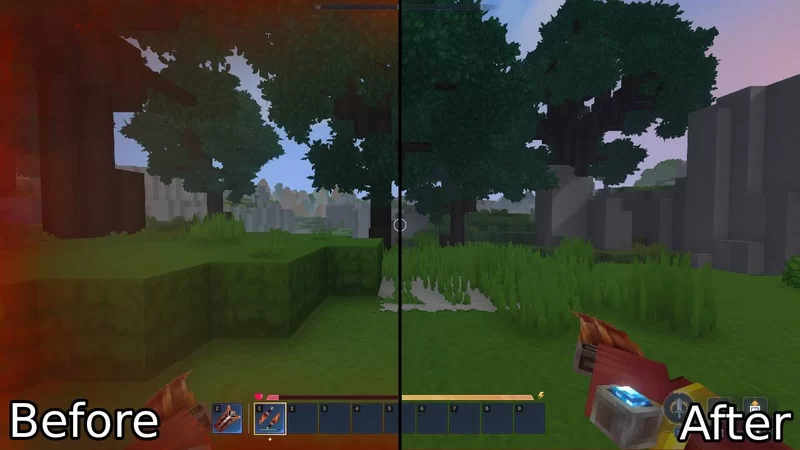
Removes the annoying indicator that gets in your way and just stresses you out when you are on low health!
Now you can easily lock in and crush enemies when you are on low health, instead of being blinded by a big red screen effect.
Also removes the annoying red flashes when you take damage!
Now you can easily lock in and crush enemies when you are on low health, instead of being blinded by a big red screen effect.
Also removes the annoying red flashes when you take damage!
| Progress | 100% complete |
| Game Version | Hytale Early Access |
| Tags |
67
7

 Dysis
Dysis Keekee1253
 xXimaginesellingXx
 BOOKOFDREWSBG
 StarryWayWishes
 zigzag5570
 NoahzArkade
Want to comment or give Power Crystals?
1. Open the Hytale folder (windows is %appdata%/Hytale, you will have to search it on Google or smth for other operating systems). In that folder there should be something called UserData or something like that. In that folder there should be one called mods. Drag the mod into that folder. Now next time you make a world press the settings button and check the mod on the left. To apply it to an already existing world right click the world and check the mod.
Option 2. Right click and already existing world and press open folder button. Drag the mod into the mods folder located there.
After you have done any of those just join the world and you are done! =D